Expectations
Expectations define what success means when an Inject targets an Asset or a Player. They answer the question: what should happen for this Inject to be considered successful?
Why use Expectations?
Expectations allow you to:
- Objectively measure your security posture across prevention, detection, vulnerability, and human response
- Evaluate both technical controls and human behavior in the same Simulation
- Standardize scoring across exercises
- Determine when a Simulation is complete (all Expectations resolved)
Expectation types
Manual Expectations
Manual Expectations are validated by an organizer. Use them to evaluate human-driven actions that cannot be detected technically: decision-making, communication, process adherence.
Typical use cases: tabletop exercises, incident response drills, awareness training.
- Add a Manual Expectation to an Inject.
- Define the score, validation mode, and expiration time.
- During the Simulation, validate the Expectation from Execution > Validations.
Automatic Expectations
Automatic Expectations are validated by technical signals from connected security tools or manually provided results. They are essential for technical Simulations and BAS (Breach and Attack Simulation) use cases.
| Type | What it validates |
|---|---|
| Prevention | A security control blocks the attack |
| Detection | A security alert or incident is raised |
| Vulnerability | A CVE is present on the target |
| Article | Targets read or acknowledge a media pressure article |
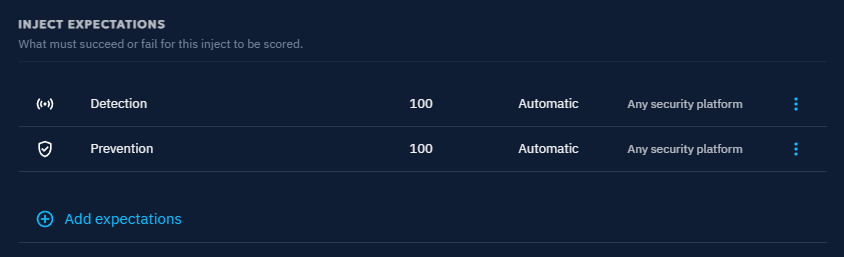
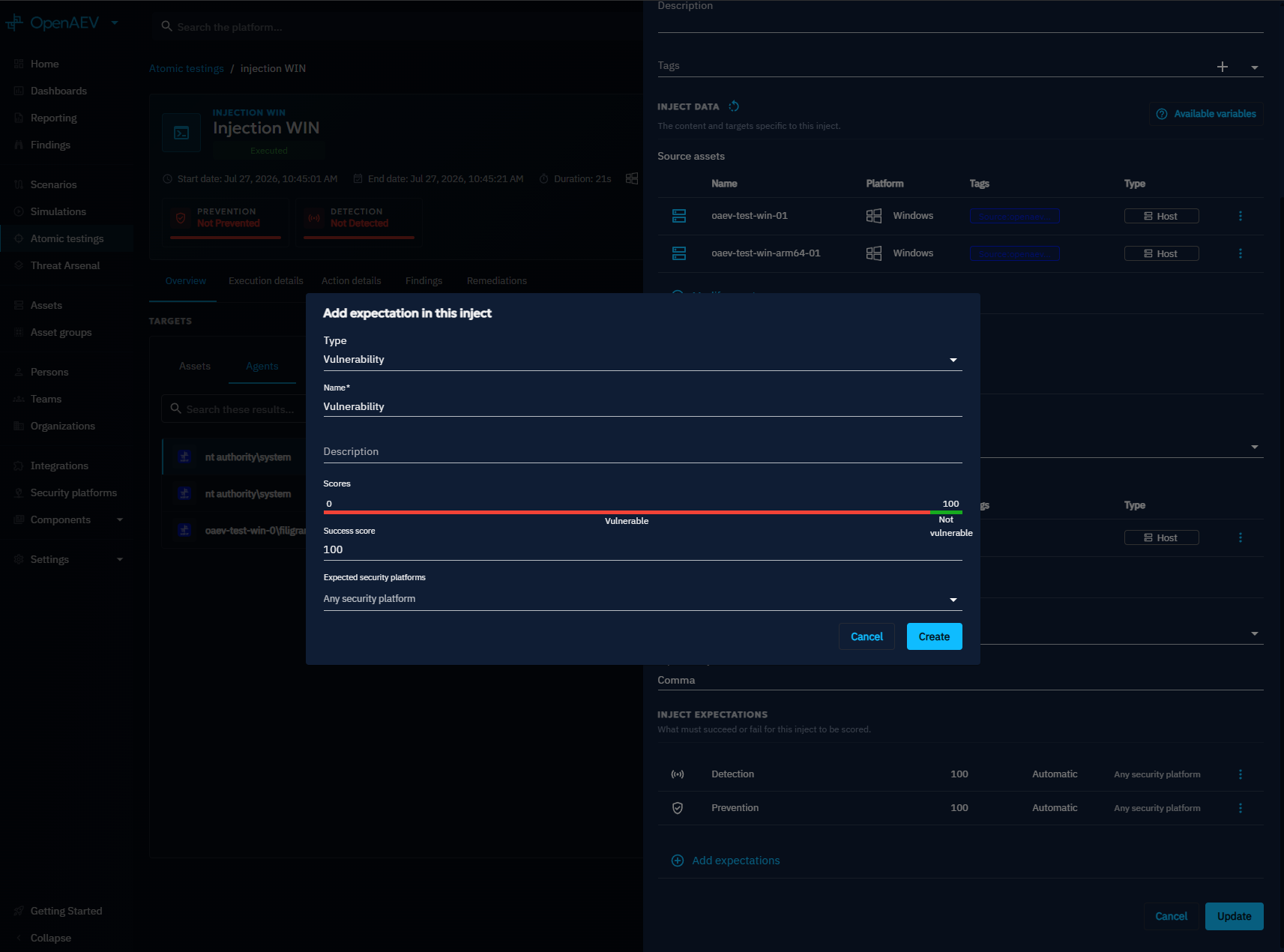
Add an Expectation to an Inject
- Open the Inject.
- Click Add expectations.
- Select the Expectation type.
- Configure the name, score, and expected security platforms.
- Click Create.
Tip
You can attach multiple Expectations to a single Inject.
Validation modes
A validation mode defines how individual target results are aggregated at group level. Each Expectation uses exactly one validation mode.
All targets must validate
Every member of the group must succeed for the Expectation to pass.
- All targets succeed: 100 (Success)
- At least one target fails: 0 (Failed)
Use this mode for compliance checks, mandatory training, and baseline security requirements.
At least one target must validate
A single successful response is enough for the Expectation to pass.
- At least 1 success: 100 (Success)
- No success: 0 (Failed)
Use this mode for SOC (Security Operations Center) detection, escalation workflows, and redundancy testing.
Result aggregation
A single Expectation can receive multiple validation results for the same Inject. This happens when several security tools monitor the same Asset, multiple Collectors report results, or results are added both manually and automatically.
Adding a manual result
When automated result retrieval is not possible (e.g., non-technical Injects), record results manually:
- Open the Inject result page.
- On the Expectation card, click Add a result: the shield icon for Detection, Prevention, and Vulnerability Expectations, the clipboard icon for Manual, Challenge, and Article Expectations.
- Fill in the result form and save.
For Manual, Challenge, and Article Expectations, the Add a result button stays available after a score is set, so you can change the score later. The new result replaces the previous one.
How the final result is computed
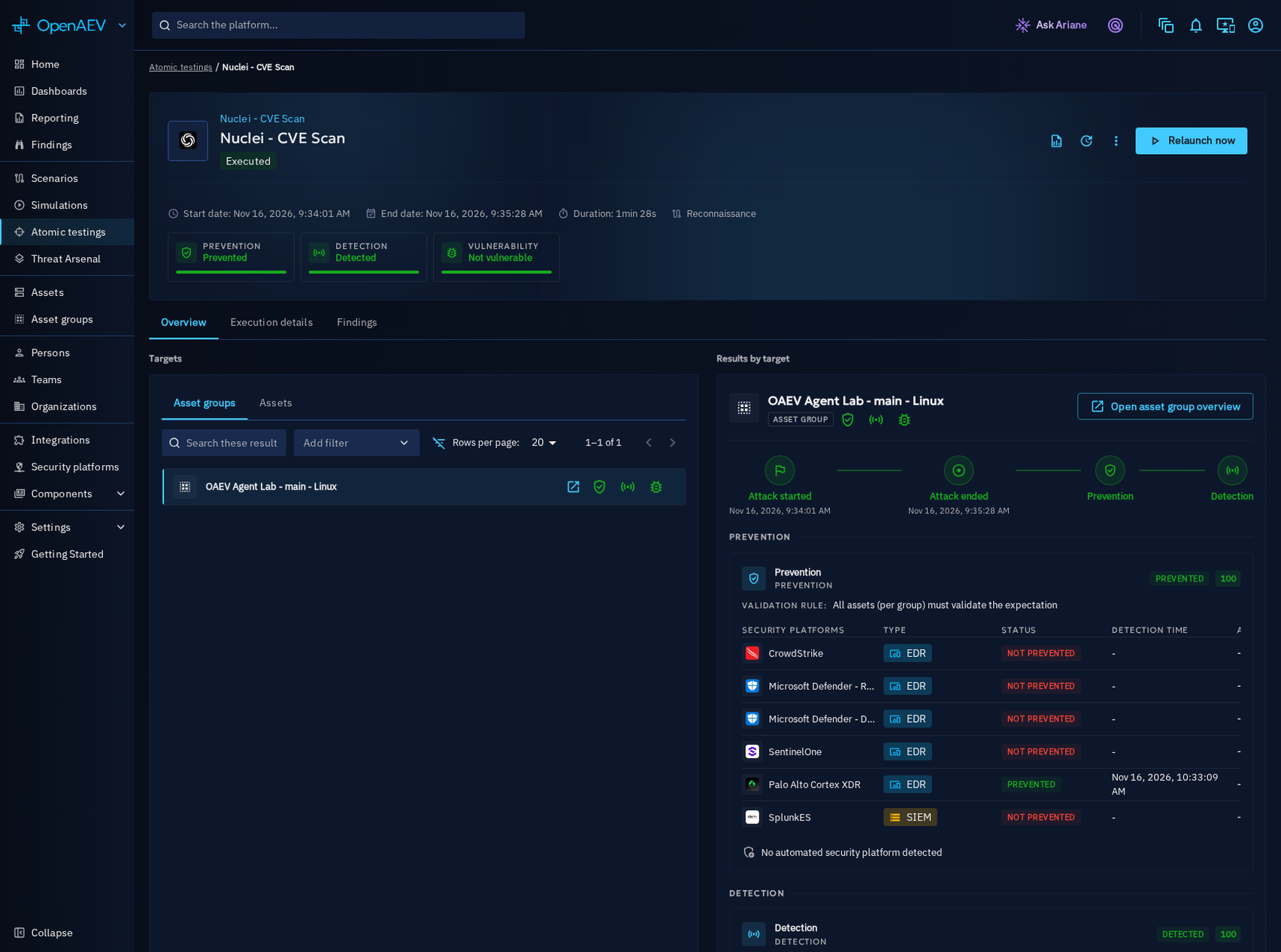
Each expected security platform adds its own result to the Expectation. For Detection and Prevention, the final score is the highest score among the results received. For Vulnerability, it is the opposite: if one source reports the Asset as vulnerable, that result wins, even when other sources found nothing.
When the score is set depends on the Expectation type:
- Detection and Prevention: OpenAEV settles the Expectation as soon as one result reaches the expected score. OpenAEV does not wait for the other security platforms. A result they send later is still recorded but cannot lower the score.
- Detection and Prevention without a success: OpenAEV waits until every expected security platform has answered, then keeps the highest score. If the Expectation expires first, OpenAEV marks the missing results as failed.
- Vulnerability: OpenAEV settles the Expectation as soon as one source reports the Asset as vulnerable. OpenAEV does not wait for the other sources, because none of them can make the Asset less vulnerable.
- Vulnerability without a finding: OpenAEV waits until every expected source has answered "Not vulnerable". If the Expectation expires first, OpenAEV marks the missing results as "Not vulnerable": no finding means the Asset is not vulnerable.
Warning
For Detection and Prevention, a negative result never overrides a positive one. If one tool detects the attack and another does not, the Expectation is marked as detected.
When no security platform can answer
Only security platform Collectors can fulfill Detection and Prevention Expectations. When the Inject executes, OpenAEV checks for a Collector linked to one of the expected security platform types (any type if none is selected). If there is none, OpenAEV marks the Expectation as failed (score 0) at once instead of waiting for its expiration. Its result card shows No automated security platform detected.
This check runs only when the Inject executes. Vulnerability Expectations are not affected.
Status propagation
Expectation results propagate from technical entities to organizational entities:
| Entity | Rule |
|---|---|
| Agent | Direct result (0 or 100) |
| Asset | Valid only if all Agents succeed |
| Asset group | Depends on validation mode |
| Player | Depends on validation mode |
| Team | Aggregated from Players |
Note
Validation mode always applies at group level.
Scoring
Each Expectation type has a default score applied at creation:
| Type | Default score |
|---|---|
| Manual | 50 |
The default score can be configured via environment variable:
| Parameter | Environment variable | Default | Description |
|---|---|---|---|
openaev.expectation.manual.default-score-value |
OPENAEV_EXPECTATION_MANUAL_DEFAULT-SCORE-VALUE |
50 | Default score for manual Expectations |
Expiration
Expectations must validate within a defined time window. If the time expires, the Expectation fails automatically and the result is marked as "Not Detected", "Not Prevented", or equivalent.
Default expiration values
| Expectation type | Default |
|---|---|
| Detection / Prevention | 6 hours |
| Human (manual, article, challenge) | 24 hours |
Override expiration times globally (environment variables) or per Expectation (UI):
| Parameter | Environment variable | Default (seconds) | Description |
|---|---|---|---|
openaev.expectation.technical.expiration-time |
OPENAEV_EXPECTATION_TECHNICAL_EXPIRATION-TIME |
21600 | Technical Expectations (detection, prevention and logging) |
openaev.expectation.detection.expiration-time |
OPENAEV_EXPECTATION_DETECTION_EXPIRATION-TIME |
21600 | Detection Expectations |
openaev.expectation.prevention.expiration-time |
OPENAEV_EXPECTATION_PREVENTION_EXPIRATION-TIME |
21600 | Prevention Expectations |
openaev.expectation.human.expiration-time |
OPENAEV_EXPECTATION_HUMAN_EXPIRATION-TIME |
86400 | Human Expectations (manual, challenge, article) |
openaev.expectation.challenge.expiration-time |
OPENAEV_EXPECTATION_CHALLENGE_EXPIRATION-TIME |
86400 | Challenge Expectations |
openaev.expectation.article.expiration-time |
OPENAEV_EXPECTATION_ARTICLE_EXPIRATION-TIME |
86400 | Article Expectations |
openaev.expectation.manual.expiration-time |
OPENAEV_EXPECTATION_MANUAL_EXPIRATION-TIME |
86400 | Manual Expectations |
Expectations drift
Injects inherit the predefined Expectations of their Injector contract at creation time and keep them as-is, even when the contract later evolves. This divergence is called expectations drift.
When at least one Inject of a Scenario, Simulation, or Atomic Test carries Expectations that no longer match its contract, a warning indicator appears in the header with the number of drifted Injects. A drifted Inject is not an error -- Expectations may have been customized on purpose. The indicator only surfaces that the underlying contracts evolved, so you can decide whether to realign.
The Realign expectations action overwrites the stored Expectations of every drifted Inject with the current predefined Expectations of its contract. Customizations are replaced by the contract defaults.
What's next?
- Inject overview -- Create and configure Injects
- Inject result -- Understand result breakdown
- Inject status -- Execution statuses and computation