OpenAEV Agent
Introduction
The OpenAEV Agent is an application whose primary role is to enroll an Asset on the OpenAEV platform, retrieve jobs or scripts to be executed, and transmit this information to Implants (subject to change) for execution on the host Asset.
The Agent does not perform direct actions on the Asset itself, in order to remain neutral with respect to antivirus solutions and ensure the full execution of simulations.
The OpenAEV Agent is compatible with multiple operating systems (Windows, Linux, macOS) and is developed in Rust.
Installation
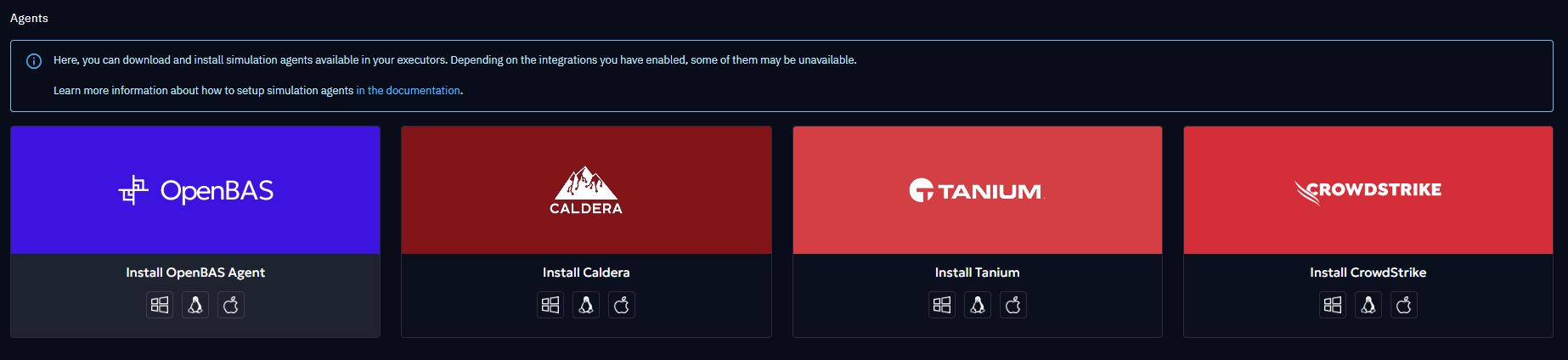
Depending on the operating system, several installation modes are available. You can access them from OpenAEV by clicking the blue icon in the top-right corner:
Note
Since release 1.14, multiple OpenAEV Agents can be installed on the same machine in order to test different execution contexts and privilege levels.
Examples:
- Install two agents using the standard installation with different privileges (standard user vs administrator).
- If an agent was previously installed using the advanced system installation (pre-1.14 behavior), a standard installation can be added to compare behaviors such as filesystem access, environment variables, and privileges.
See the OS-specific sections below for details.
Warning
Antivirus exclusions described in this documentation are mandatory for OpenAEV to function correctly.
Exclusions must apply only to the runtimes subfolder.
threat arsenal actions are intentionally stored elsewhere so that detection and blocking remain possible when relevant.
Quick Compatibility Check
Before installing the OpenAEV Agent, ensure that all the following conditions are met:
-
Supported CPU architecture: x64 or ARM64 only
-
Supported service manager:
- Windows: Service Control Manager
- Linux: systemd
- macOS: launchd
-
Security requirements:
- TLS 1.2 or higher
- Administrative privileges (Administrator / root / sudo)
-
Network access:
- Outbound connectivity to the OpenAEV instance
If any of these requirements are not met, installation will fail or behave unpredictably.
Best Effort Support
“Best effort” support means that the OpenAEV Agent may work, but:
- the environment is not officially validated,
- stability and long-term support are not guaranteed,
- additional configuration may be required,
- environment-specific issues may not be prioritized.
Windows
Operating system & architecture
| Architecture | Support level |
|---|---|
| x64 | ✅ Supported |
| ARM64 | ✅ Supported |
| x86 (32-bit) | ❌ Not supported |
| ARM32 | ❌ Not supported |
| Operating system | Support level | Notes |
|---|---|---|
| Windows 10 | ✅ Supported | |
| Windows 11 | ✅ Supported | |
| Windows Server 2019 | ✅ Supported | |
| Windows Server 2022 | ✅ Supported | |
| Windows 8 / 8.1 | ⚠️ Best effort | No guaranteed fixes |
| Windows Server 2016 | ⚠️ Best effort | No guaranteed fixes |
| Windows Server 2012 R2 | ⚠️ Best effort | No guaranteed fixes |
| Windows 7 and earlier | ❌ Not supported | |
| Windows Server 2008 / 2008 R2 | ❌ Not supported |
Runtime & tooling
Note
If the installation fails, try using PowerShell 7 or higher.
- TLS 1.2 or higher must be available
- The system
Pathenvironment variable must include:%SYSTEMROOT%\System32\and%SYSTEMROOT%\System32\WindowsPowerShell\v1.0\
Privileges & security
- Installation and execution require local administrator privileges
-
For Advanced installation as User (service):
- The target user must have the “Log on as a service” policy enabled
- See: https://learn.microsoft.com/en-us/system-center/scsm/enable-service-log-on-sm
Antivirus
- Antivirus exclusions are mandatory and must apply only to the
runtimesdirectory
Installation Mode
[UserSanitized] in the table below means username without special character like "\", "/",...
| Installation mode | Installation | Installation type | Execution agent and threat arsenal action | Verification/Start/Stop agent | Folder path | AV exclusions | Uninstallation |
|---|---|---|---|---|---|---|---|
| Standard installation (session) | Asset with GUI and terminal with standard privileges or admin privileges for the logged-in user | User session (standard privileges): start up app WriteRegStrOR User session (admin privileges): start up task schtasks |
Background, only when user is logged in, with the user privilege from the powershell elevation and environment | Get-Process openaev-agent \| Where-Object { $_.Path -eq "[FOLDER_PATH]\openaev-agent.exe" }Get-Process openaev-agent \| Where-Object { $_.Path -eq "[FOLDER_PATH]\openaev-agent.exe" } \| Stop-Process -ForceStart-Process "[FOLDER_PATH]\openaev-agent.exe" |
$HOME\.openaev\OAEVAgent-Session-[UserSanitized]OR $HOME\.openaev\OAEVAgent-Session-Administrator-[UserSanitized] |
$HOME\.openaev\OAEVAgent-Session-[UserSanitized]\runtimesOR $HOME\.openaev\OAEVAgent-Session-Administrator-[UserSanitized]\runtimes |
Stop the agent in background and "uninstall.exe" from the path folder |
| Advanced installation as User (service) | Enable the "Service Logon" policy (see above) Terminal with admin privileges, replace params [USER] and [PASSWORD] in the bash snippet and in the following commands by the username with domain and password wanted |
Service: sc (with user and password in service conf) |
Background, as soon as the machine powers on, with the user privilege and environment | Get-Service -Name "OAEVAgent-Service-[UserSanitized]"Start-Service -Name "OAEVAgent-Service-[UserSanitized]"Stop-Service -Name "OAEVAgent-Service-[UserSanitized]" |
$HOME\.openaev\OAEVAgent-Service-[UserSanitized] |
$HOME\.openaev\OAEVAgent-Service-[UserSanitized]\runtimes |
"uninstall.exe" from the path folder Disable the "Service Logon" policy for the user (see above) |
| Advanced installation as System (service) | Terminal with admin privileges for the authority system user | Service: sc |
Background, as soon as the machine powers on, with the root privilege and environment | Get-Service -Name "OAEVAgentService"Start-Service -Name "OAEVAgentService"Stop-Service -Name "OAEVAgentService" |
C:\Program Files (x86)\Filigran\OAEV Agent |
C:\Program Files (x86)\Filigran\OAEV Agent\runtimes |
"uninstall.exe" from the path folder |
Linux
Operating system & architecture
| Architecture | Support level | Notes |
|---|---|---|
| x86_64 | ✅ Supported | |
| ARM64 | ✅ Supported | |
| 32-bit architectures | ❌ Not supported | |
| Other CPU architectures | ❌ Not supported |
| Distribution type | Support level | Notes |
|---|---|---|
| systemd-based distributions (Debian, Ubuntu, etc.) | ✅ Supported | systemd required |
| Non-systemd distributions | ❌ Not supported | Installer relies on systemd |
Runtime & tooling
- systemd must be installed and running
- curl must be available
- TLS support must be enabled
Privileges & security
- Installation and execution require root or sudo privileges
- User-based services require permission to manage
systemctl --user
| Installation mode | Installation | Installation type | Execution agent and threat arsenal action | Verification/Start/Stop agent | Folder path | AV exclusions | Uninstallation |
|---|---|---|---|---|---|---|---|
| Standard installation (session) | Asset with GUI and terminal with standard privileges for the logged-in user | User service: systemctl --user |
Background, only when user is logged in, with the user privilege and environment | systemctl --user enable openaev-agent-sessionsystemctl --user start openaev-agent-sessionsystemctl --user stop openaev-agent-session |
$HOME/.local/openaev-agent-session |
$HOME/.local/openaev-agent-session/runtimes |
systemctl --user stop openaev-agent-session & systemctl --user disable openaev-agent-session & systemctl --user daemon-reload & systemctl --user reset-failed & rm -rf $HOME/.local/openaev-agent-session |
| Advanced installation as User (service) | Terminal with sudo privileges, replace params [USER] and [GROUP] in the bash snippet and in the following commands by the username and group wanted |
Service: systemctl (with user and group in service conf) |
Background, as soon as the machine powers on, with the user privilege and environment | systemctl enable [USER]-openaev-agentsystemctl start [USER]-openaev-agentsystemctl stop [USER]-openaev-agent |
$HOME/.local/openaev-agent-service-[USER] |
$HOME/.local/openaev-agent-service-[USER]/runtimes |
sudo systemctl stop [USER]-openaev-agent & sudo systemctl disable [USER]-openaev-agent & sudo systemctl daemon-reload & sudo systemctl reset-failed & sudo rm -rf $HOME/.local/openaev-agent-service-[USER] |
| Advanced installation as System (service) | Terminal with sudo privileges | Service: systemctl |
Background, as soon as the machine powers on, with the root privilege and environment | systemctl enable openaev-agentsystemctl start openaev-agentsystemctl stop openaev-agent |
/opt/openaev-agent |
/opt/openaev-agent/runtimes |
sudo systemctl stop openaev-agent & sudo systemctl disable openaev-agent & sudo systemctl daemon-reload & sudo systemctl reset-failed & sudo rm -rf /opt/openaev-agent |
Note
To allow command threat arsenal action execution without sudo password prompts, see:
this tutorial
macOS
Operating system & architecture
| Architecture | Support level | Notes |
|---|---|---|
| ARM64 (Apple Silicon) | ✅ Supported | |
| x86_64 (Intel) | ⚠️ Best effort | Limited testing |
| 32-bit architectures | ❌ Not supported | |
| Other CPU architectures | ❌ Not supported |
| macOS version | Support level | Notes |
|---|---|---|
| launchd-based macOS (10.4 Tiger and later) | ✅ Supported | launchd required |
| macOS Sonoma (14) | ⚠️ Best effort | Latest version |
Runtime & tooling
- launchd must be available and running
- curl must be available
- TLS support must be enabled
-
The system must allow:
- Execution of downloaded binaries
- Write and execute permissions in the installation directory
Privileges & security
- Installation and execution require administrator privileges
Warning
Temporary limitation: on macOS, Standard installation (session) and Advanced installation as User (service) are currently unavailable. Use Advanced installation as System (service).
| Installation mode | Installation | Installation type | Execution agent and threat arsenal action | Verification/Start/Stop agent | Folder path | AV exclusions | Uninstallation |
|---|---|---|---|---|---|---|---|
| Standard installation (session) | Asset with GUI and terminal with standard privileges for the logged-in user | User service: launchctl user |
Background, only when user is logged in, with the user privilege and environment | launchctl enable gui/$(id -u)/openaev-agent-sessionlaunchctl bootstrap gui/$(id -u) ~/Library/LaunchAgents/openaev-agent-session.plistlaunchctl bootout gui/$(id -u) ~/Library/LaunchAgents/openaev-agent-session.plist |
$HOME/.local/openaev-agent-session |
$HOME/.local/openaev-agent-session/runtimes |
launchctl remove openaev-agent-session & rm -rf $HOME/.local/openaev-agent-session |
| Advanced installation as User (service) | Terminal with sudo privileges, replace params [USER] and [GROUP] in the bash snippet and in the following commands by the username and group wanted |
Service: launchctl user (as agent, with user and group in service plist) |
Background, as soon as the machine powers on, with the user privilege and environment | launchctl enable gui/[USER-ID]/[USER]-openaev-agentlaunchctl bootstrap gui/[USER-ID] /Library/LaunchAgents/[USER]-openaev-agent.plistlaunchctl bootout gui/[USER-ID] ~/Library/LaunchAgents/[USER]-openaev-agent.plist |
$HOME/.local/openaev-agent-service-[USER] |
$HOME/.local/openaev-agent-service-[USER]/runtimes |
sudo launchctl remove [USER]-openaev-agent & sudo rm -rf $HOME/.local/openaev-agent-service-[USER] |
| Advanced installation as System (service) | Terminal with sudo privileges | Service: launchctl system |
Background, as soon as the machine powers on, with the root privilege and environment | launchctl enable system/openaev.agentlaunchctl bootstrap system /Library/LaunchDaemons/openaev-agent.plistlaunchctl bootout system/ ~/Library/LaunchDaemons/openaev-agent.plist |
/opt/openaev-agent |
/opt/openaev-agent/runtimes |
sudo launchctl remove openaev-agent & sudo rm -rf /opt/openaev-agent |
Note
To allow command threat arsenal action execution without sudo password prompts, see:
this tutorial
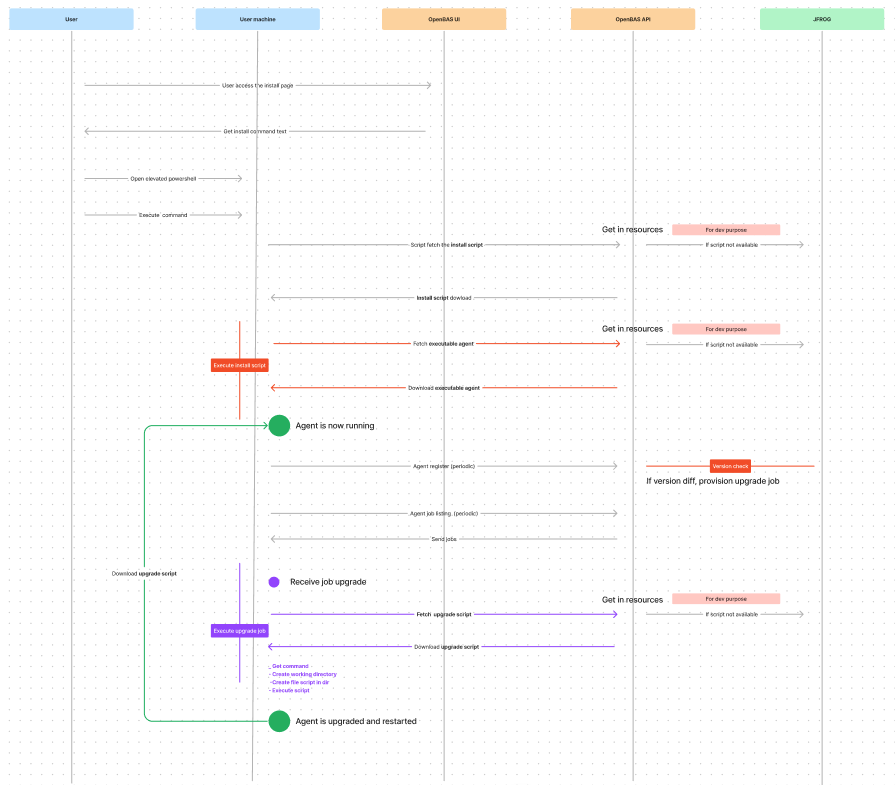
Agent Installation Flow
Network Traffic
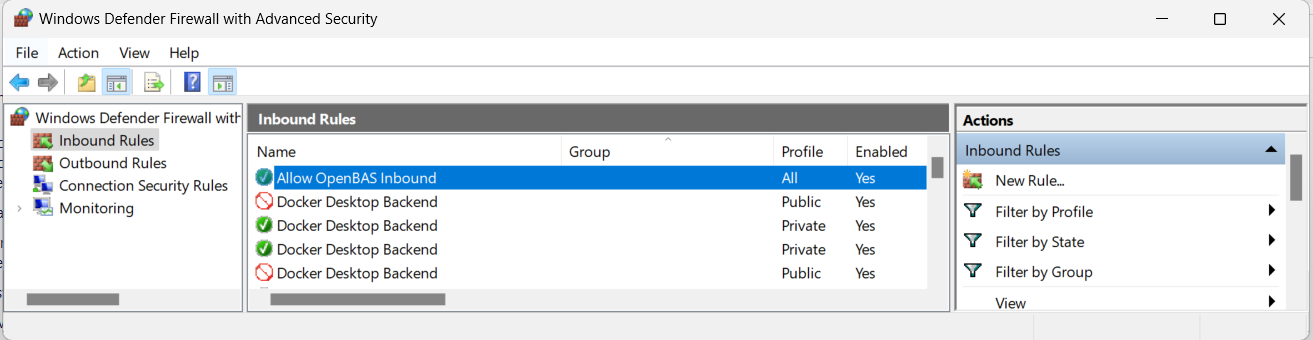
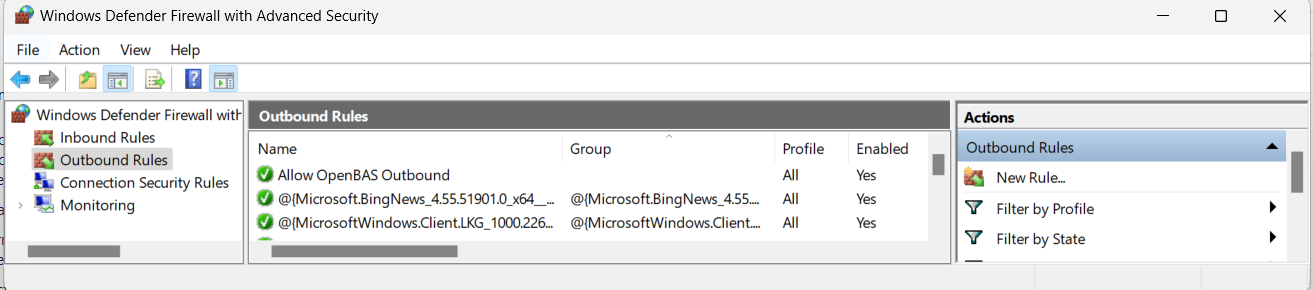
The installation creates two firewall rules:
Inbound rule
Outbound rule
Proxy Configuration
To use a proxy with the OpenAEV Agent, define both HTTP_PROXY and HTTPS_PROXY before running the installer.
You can configure them in either of the following ways: - Machine-wide (persistent): set them as system environment variables so they are available globally. - Session-only (temporary): set/export them in the same terminal session immediately before executing the installation script.
If the agent is installed as a service, make sure these variables are also available to the service account.
Verify that your proxy is correctly configured and communicate well with your OpenAEV Agent installed.
Features
The main features of the OpenAEV Agent include:
- Agent registration on the OpenAEV platform
- Automatic agent upgrade (on startup and registration)
- Periodic job retrieval (every 30 seconds)
- Implant lifecycle management
- Execution cleanup and directory pruning (garbage collector running every 3 minutes):
- Directories matching
runtimes/execution-*andpayloads/execution-*older than 10 minutes are processed: associated processes are killed, then the directories are renamed fromexecution-*toexecuted-*. - Directories matching
runtimes/executed-*andpayloads/executed-*older than 10 minutes are permanently deleted.
- Directories matching
- Health checks (heartbeat every 2 minutes)
Cleanup Configuration
The garbage collector thresholds can be customized in the agent's openaev-agent-config.toml file:
| Parameter | Description | Default value |
|---|---|---|
executing_max_time_minutes |
Maximum time (in minutes) an execution-* directory can exist before processes are killed and the directory is renamed to executed-* |
10 |
directory_max_time_minutes |
Maximum time (in minutes) an executed-* directory can exist before it is permanently deleted |
10 |
cleanup_interval_seconds |
Interval (in seconds) between cleanup cycles | 180 |
Example configuration in openaev-agent-config.toml:
[cleanup]
executing_max_time_minutes = 10
directory_max_time_minutes = 10
cleanup_interval_seconds = 180
Security
Agent Token Scope and Privilege Isolation
OpenAEV enforces strict segregation of duties for agent token authentication.
The agent token has a deliberately narrow scope: it is only permitted to retrieve jobs to execute, retrieve documents, and send back results. It cannot be used to perform any administrative action or access any resource outside of that execution flow.
Troubleshooting
Logs are available at the following locations (see installation tables for paths):
- Linux →
[FOLDER_PATH]/openaev-agent.log - macOS →
[FOLDER_PATH]/openaev-agent.log - Windows →
[FOLDER_PATH]\openaev-agent.log
When an implant is deployed, a new directory is created under runtimes, named after the inject ID.
This directory contains:
- The implant executable
- Execution-specific logs