Payloads
In OpenAEV, payloads are key components used to build and customize injects. They allow you to enrich your scenarios with dynamic, reusable content tailored to various attack simulations.
Payloads List View
The Payloads view displays a list of all available payloads in the platform. Each entry includes the following columns:
| Column | Description |
|---|---|
| Type | The kind of payload (e.g., Command Line, Executable, File Drop, DNS Resolution). |
| Name | The name assigned to the payload. |
| Platforms | The platforms the payload supports (e.g., Windows, Linux, macOS). |
| Description | A brief explanation of what the payload does. |
| Tags | Tags to help categorize and search for payloads. |
| Source | The origin of the payload (see Payload Sources). |
| Status | The reliability or lifecycle state of the payload (see Payload Status Logic). |
| Updated | The last modification date. |
Payload Status Logic
Payloads can have one of the following statuses:
-
Verified ✅
OpenAEV has tested the payload and confirmed it works as expected. -
Unverified ⚠️
The payload has not been tested by OpenAEV. It may or may not work. -
Deprecated ❌
The original source has marked the payload as deprecated. It’s kept for reference, but functionality is not guaranteed.
Payload Sources
Each payload has a source indicating its origin:
-
Community 🌍
Submitted by external users. May vary in quality or coverage. -
Manual ✍️
Custom payload created within your OpenAEV instance. -
Filigran 📦
From the official Filigran payload library, curated and maintained by Filigran.
Create a Payload
To create a new payload, follow these steps:
- Click the "+" button in the bottom right corner of the screen.
- In the General Information tab, fill in the required details about the payload.
2.1. Assign a name to your new payload and provide additional general details such as description, attack patterns and tags.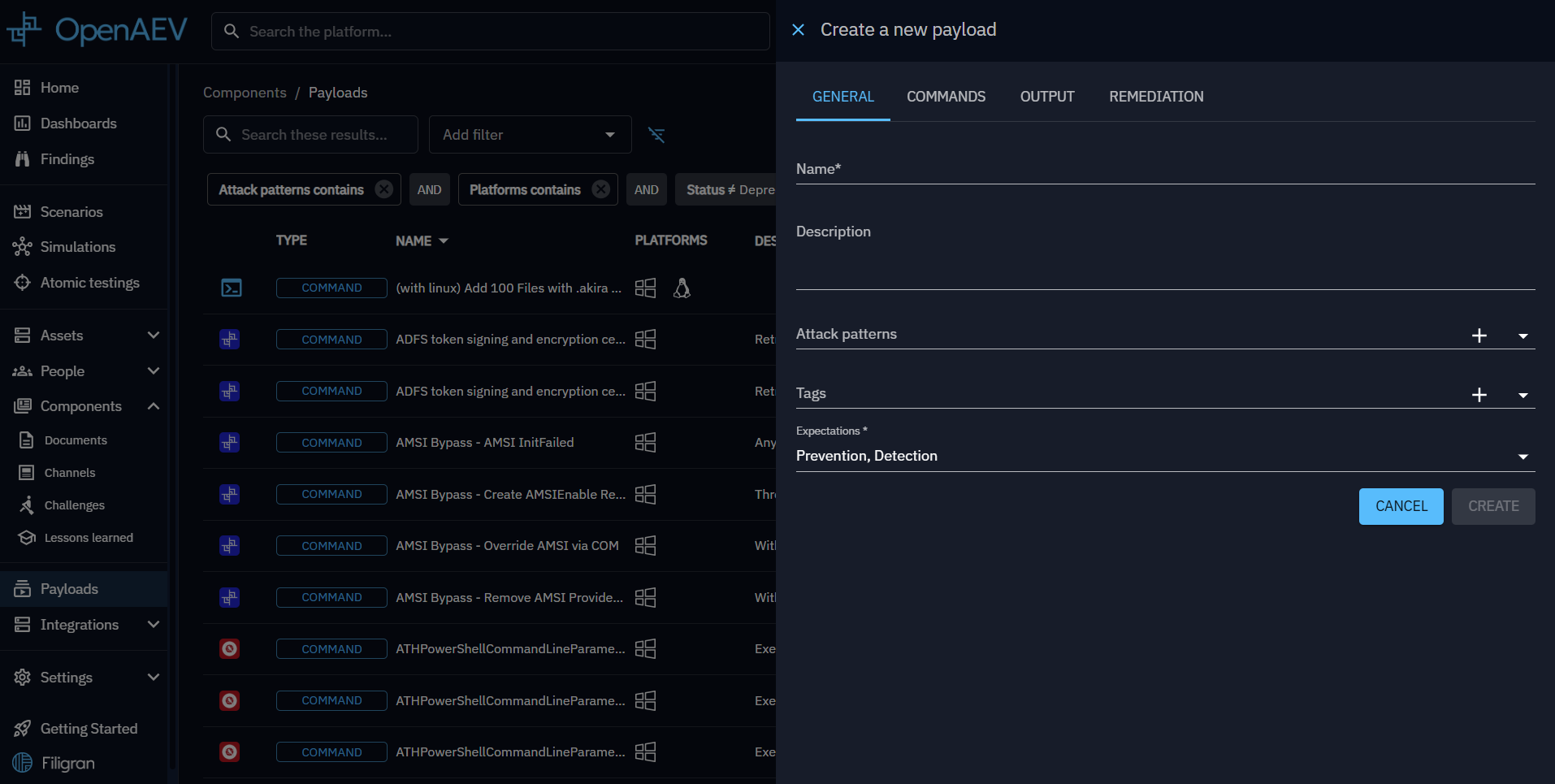
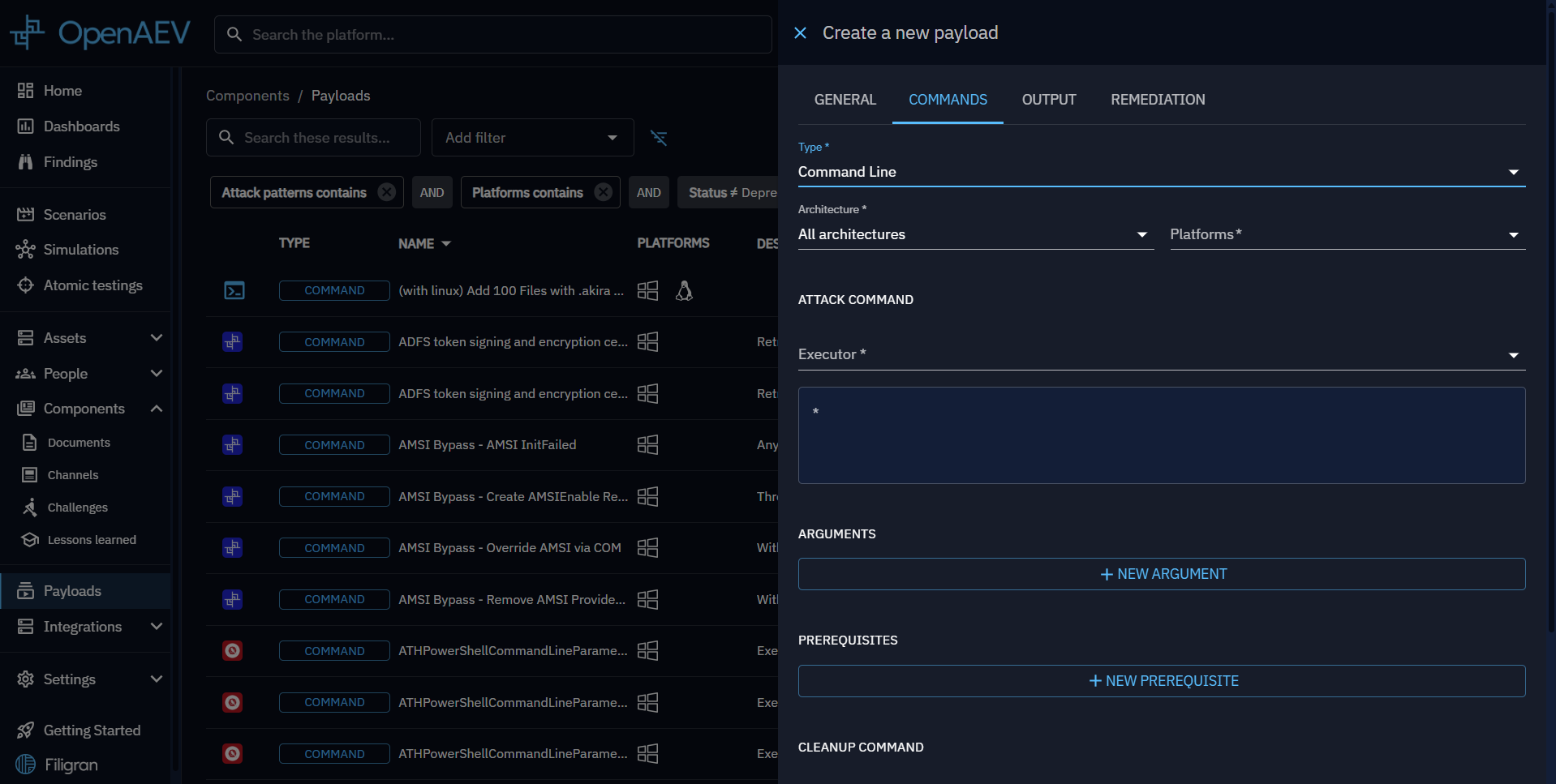
- In the Commands tab:
3.1. Choose a payload type based on your needs:- Command Line: Executes a command using an executor (e.g., PowerShell, Bash, etc.).
- Executable: Runs an executable file on an asset.
- File Drop: Drops a file onto an asset.
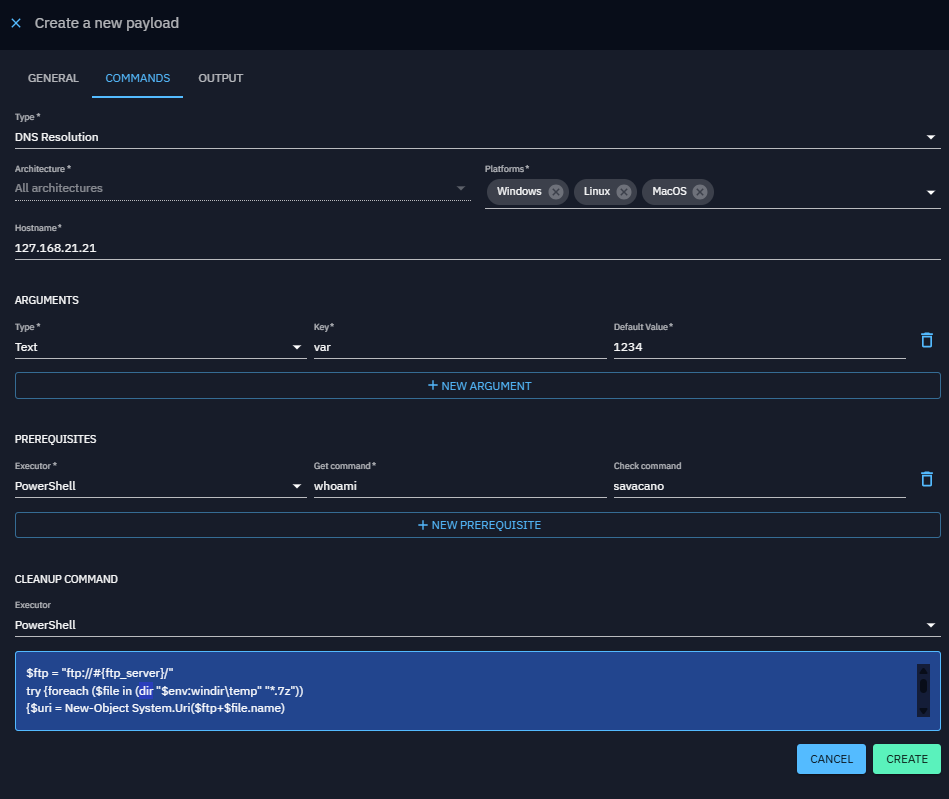
- DNS Resolution: Resolves a hostname into IP addresses.
3.2. Specify the platform and provide additional command details, such as arguments and prerequisites.
3.3. Specify a cleanup executor and cleanup command to remove any remnants from execution on the asset.
-
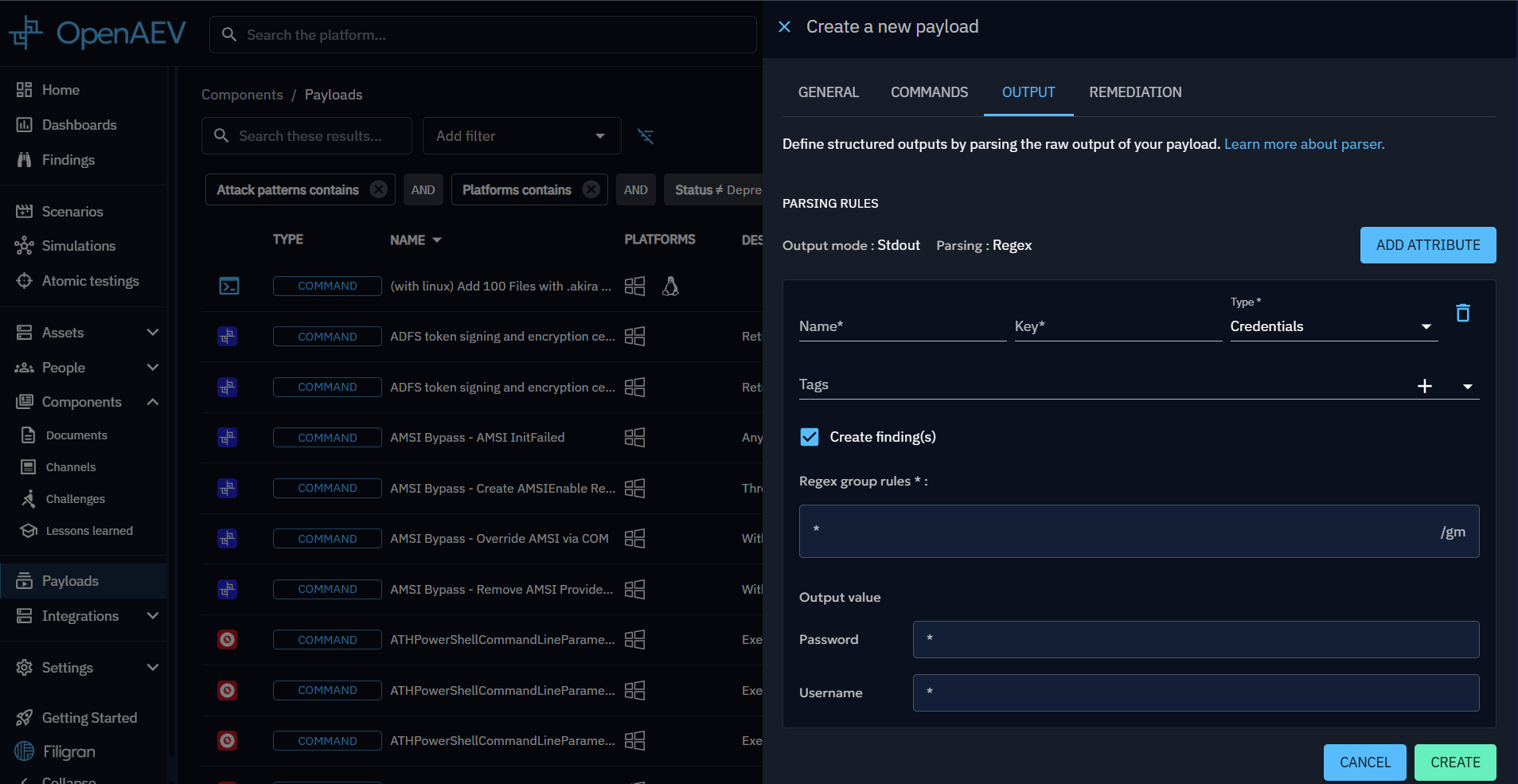
In the Output Parsers tab (optional):
4.1. Add Output Parsers to process the raw output of your execution.
4.2. Specify whether to generate Findings from the output.
-
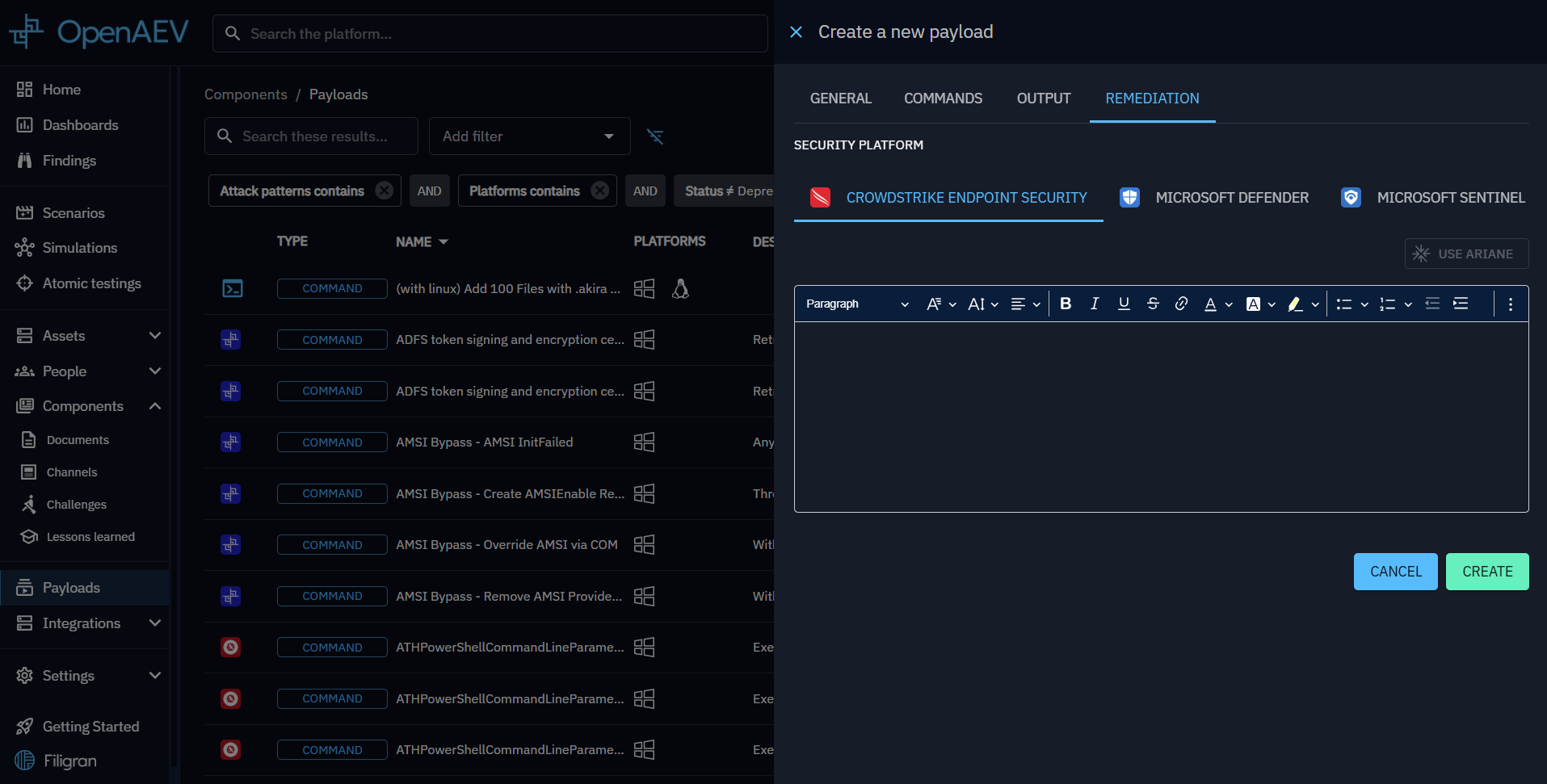
In the Remediation tab (optional and EE):
This section allows payload creators to define detection rules to identify payloads that were not blocked or detected by existing security systems (such as EDRs, SIEMs, etc.).
A dedicated Remediation tab is available for each collector integrated into the platform.5.1 Use Ariane, allows payload creators to generate rules using AI, for payload of type Command or DnsResolution and for the collector Splunk or Crowdstrike
Status of detection remediation rules
| Status | Description |
|---|---|
| Rules written by Human | The rules have been written by a human |
| Rules generated by AI | The rules have been generated by AI |
| Payload changed since rule was edited | The payload has been edited since last AI rules generation (relevant fields) |
Fields used for AI rules generation
| Fields | Tab |
|---|---|
| Name | General |
| Description | General |
| Attack patterns | General |
| Type | Commands |
| Architecture | Commands |
| Platforms | Commands |
| Attack command - Executors (Command) | Commands |
| Attack command - Content (Command) | Commands |
| Arguments | Commands |
| Hostname (DnsResolution) | Commands |
Once completed, your new payload will appear in the payload list.
General Payload properties
| Property | Description |
|---|---|
| Name | Payload name |
| Description | Payload description |
| Attack patterns | Command-related attack patterns |
| Tags | Tags |
Commands Common Payload properties
| Property | Description |
|---|---|
| Type | Type of payload such as Command Line, Executable, File Drop or Dns Resolution |
| Architecture | Architecture in which the command can be executed (x86_64, arm64, all architectures) |
| Platforms | Compatible platforms (ex. Windows, Linux, MacOS) |
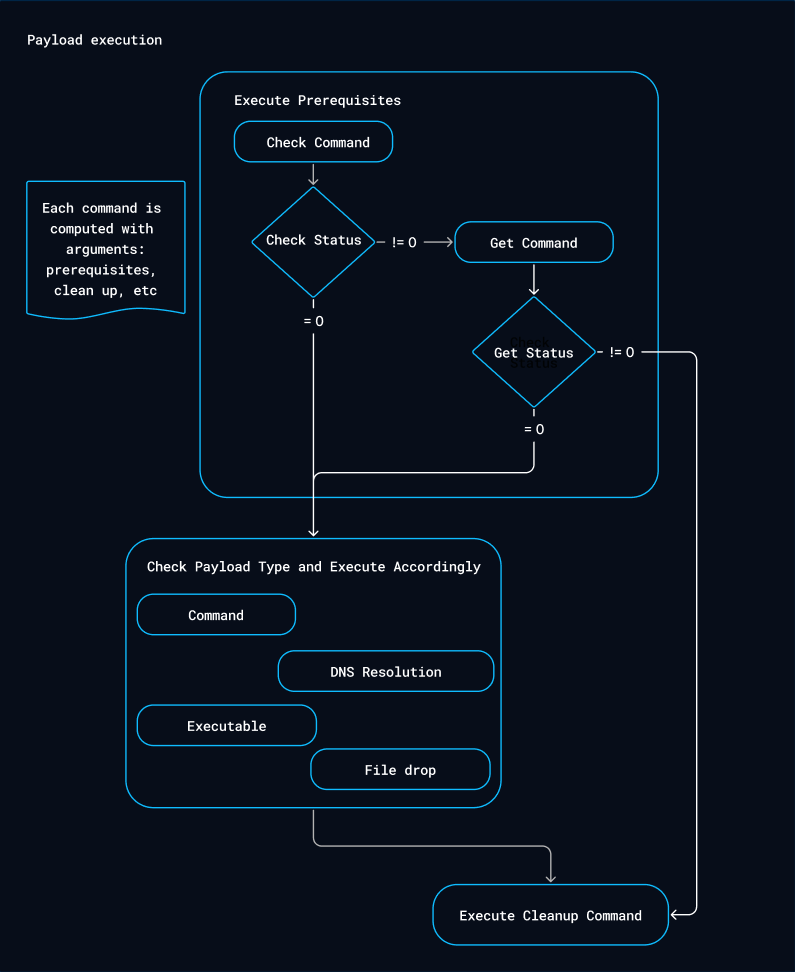
| Prerequisites | Prerequisites required to execute the command |
| Cleanup executor | Executor for cleaning commands |
| Cleanup command | Cleanup command to remove or reset changes made |
| Arguments | Arguments for the cleanup, prerequisites and potential command line |
Arguments in depth
Arguments allow you to dynamically set variables within command lines, which can be for cleanup commands, prerequisites, or execution commands.
We support two types of arguments: text and targeted asset.
For text arguments, you can specify
- Key: This is how you reference the argument in your command using a placeholder.
- Default Value: During execution, this placeholder is replaced with the argument's value. This default value can be overridden when creating an inject.
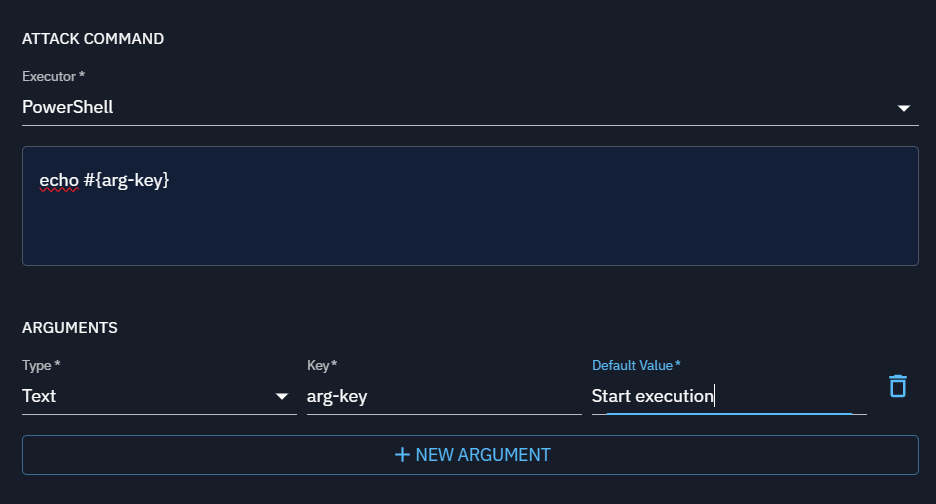
For targeted asset arguments, you can specify several attributes within the payload:
- Key: This is how you reference the argument in your command using a placeholder.
- Targeted Property: This determines which attribute of each targeted asset to use in the command, such as local IP, seen IP, or hostname.
- Separator: This is used to separate multiple values when the command is executed, allowing you to format the arguments correctly in your script (e.g., using a comma to separate values).
Let's consider a practical example: If I want to create a payload using 'nuclei' for scanning, I would create a payload
with a command like nuclei -t #{asset-key}. I'd set up a targeted asset argument with the key "asset-key".
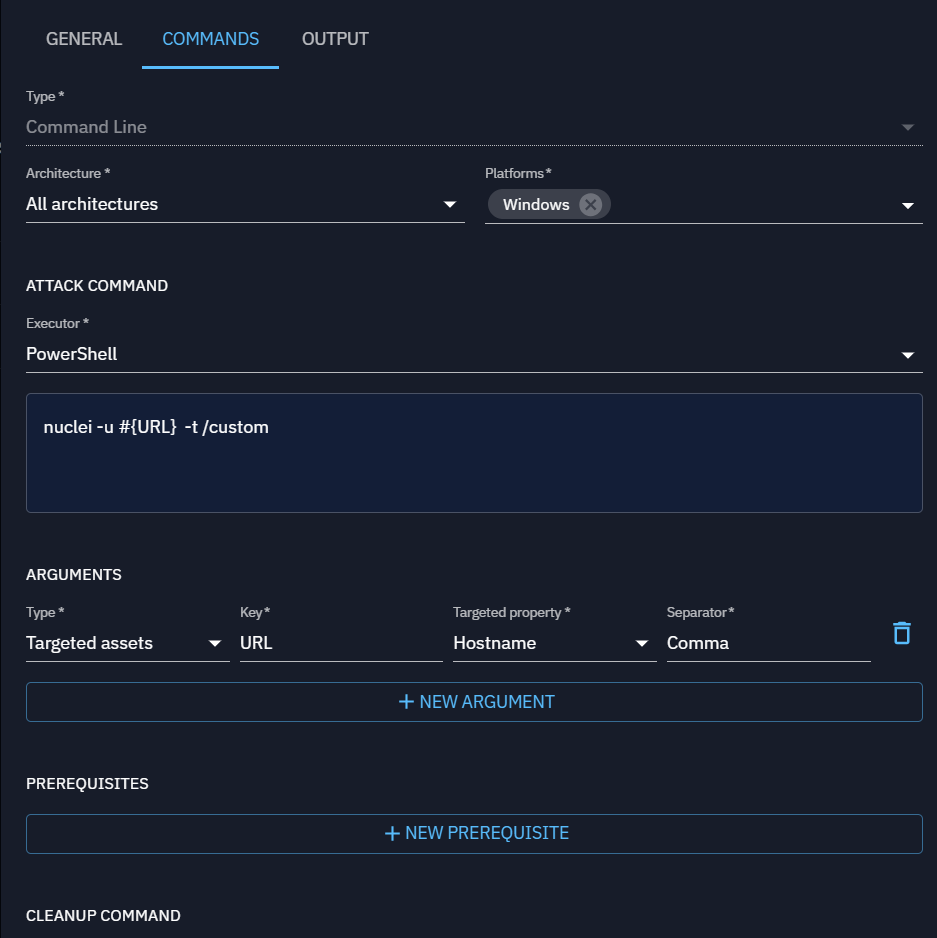
Next, I would create an inject based on this payload. In this inject, I'd designate a source asset, which is where the
command will execute (such as the asset where 'nuclei' is installed), and define the targeted assets that will serve as
the scan targets.
Prerequisites in depth
| Property | Description |
|---|---|
| Command executor | Executor for prerequisite |
| Check command | Verifies if specific condition are met |
| Get command | Run command if check command failed |
Additional Payload properties by type
Command Line
This payload type executes commands directly on the command line interface (CLI) of the target system (e.g., Windows Command Prompt, PowerShell, Linux Shell).
Command Line payloads are used for remote command execution to simulate common attacker actions like privilege escalation or data exfiltration.
| Property | Description |
|---|---|
| Command executor | Executor for command to execute |
| Command | Command to execute |
Executable
An Executable payload involves delivering a binary file (such as .exe on Windows or ELF on Linux) that the system runs as an independent process.
Executables can perform a variety of functions, from establishing a backdoor to running complex scripts (mimic malware).
| Property | Description |
|---|---|
| Executable file | File to execute |
File Drop
File Drop payloads are designed to deliver files (e.g., scripts, documents, binaries) to the target system without immediately executing them.
The goal is typically to simulate scenarios where attackers place files in specific locations for later use, either manually or by another process.
| Property | Description |
|---|---|
| File to drop | File to drop |
DNS Resolution
DNS resolution payloads attempts to resolve hostnames to associated IP address(es).
The goal of DNS resolution is to test if specific hostnames resolve to IP addresses correctly, helping assess network accessibility, detect issues, and simulate potential attacker behavior.
| Property | Description |
|---|---|
| Hostnames | Hostname list to resolve |
Output Parsers
Output Parsers allows processing the raw output from an execution. You can define rules to extract specific data from the output and link it to variables.
These variables can then be used for chaining injects.
Currently, Output Parsers support:
- Output Mode: StdOut
- Parsing Type: REGEX
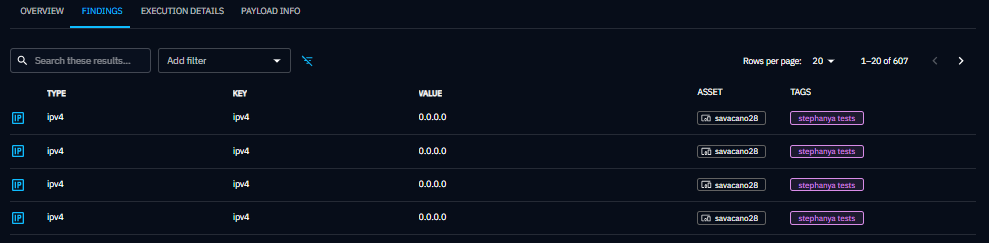
If the extracted data is compatible with a Finding, you can enable "Show in Findings" option.
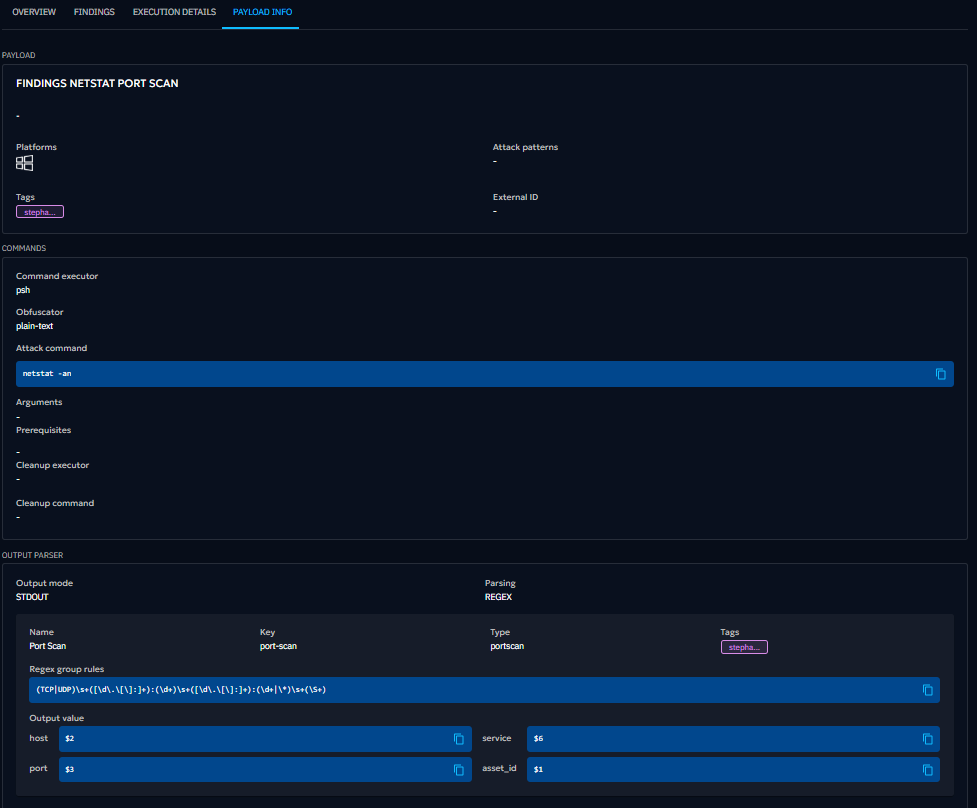
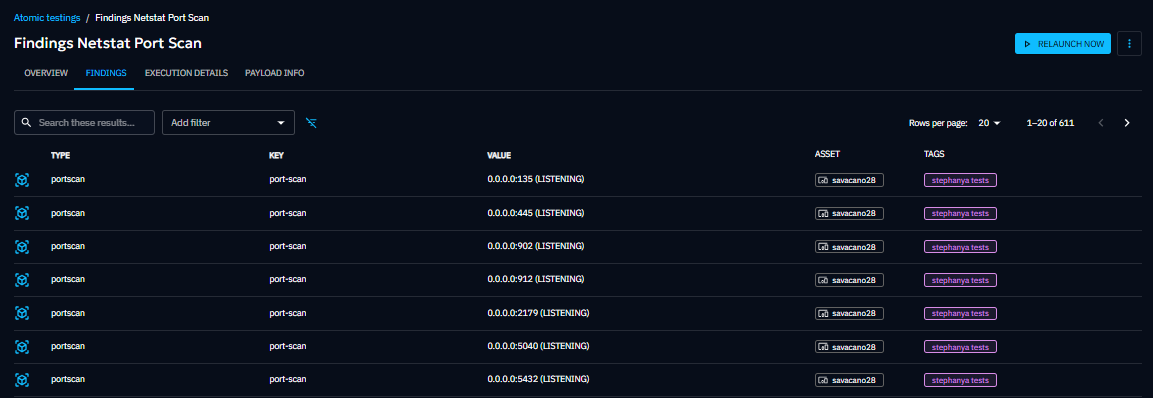
The findings results and the details of the output parser will also be available in the Findings and Payload Info tabs of the Atomic Testing Detail View.
Defining a Rule
When adding a rule, the following properties must be defined:
| Property | Description | Mandatory |
|---|---|---|
| Name | The name of the rule. | Yes |
| Key | A unique key identifier. | Yes |
| Type | The data type being extracted (e.g., Text, Number, Port, IPv4, IPv6, Port Scan, Credentials). | Yes |
| Tags | No | |
| Regex | A regular expression (REGEX) to extract data from the raw output. Supports capturing groups and line anchors (e.g., ^ for start of line). Currently, We use these flags by default: Pattern.MULTILINE, Pattern.CASE_INSENSITIVE, Pattern.UNICODE_CHARACTER_CLASS. | Yes |
| Output Value | Map each regex capture group to the corresponding fields based on the selected type. | Yes |
Output Value Mapping
Depending on the Type, a specific number of fields can be extracted using the group index from the regex :
| Type | Fields | Output format |
|---|---|---|
| Port Scan | host, port, service | host:port (service) |
| Credentials | username, password | username:password |
| Cve | host, id, severity | host:id (severity) |
| Other | single extracted value | single value |
The group index must start with $ to differentiate between multiple capture groups.
Example: Extracting Elements with Regex for a Port Scan Rule
In the next image, you can see a rule named Port Scan (port_scan) with the type Port Scan. This rule includes a
regex pattern(^\\s*(TCP|UDP)\\s+([\\d\\.]+|\\*)?:?(\\d+)\\s+\\S+\\s+(\\S+)), which defines four capture groups
you could extract from the raw output.
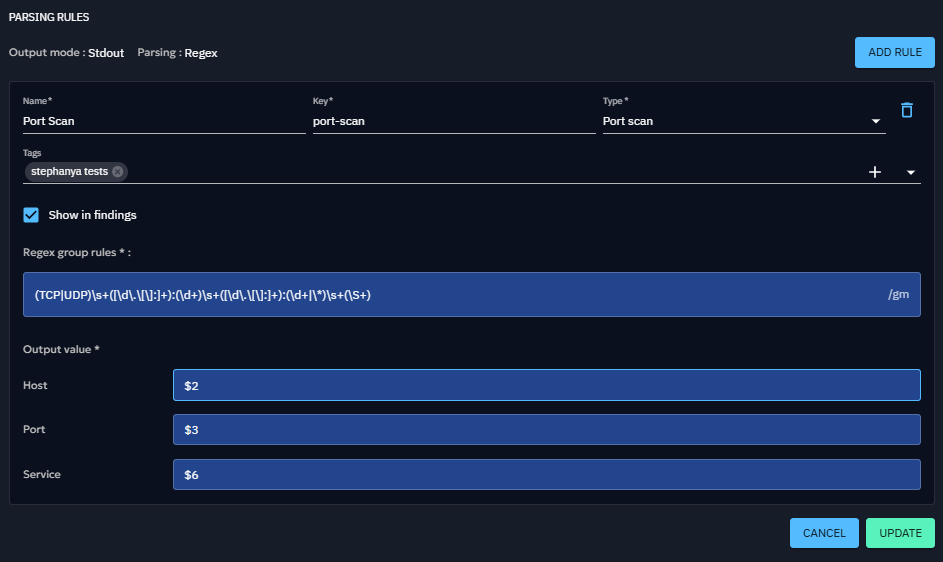
You can define the group used to build the output in the Output Value section. For this example, each field is mapped to a specific capture group:
- Host (
$2) - Port (
$3) - Service (
$6)
The finding generated would be:
If you want to combine multiple groups in a field, you have to concatenate them like $n$m (placing the group
references next to each other). The final value of the field will be a composition of these groups.
Payload execution workflow
Use a Payload
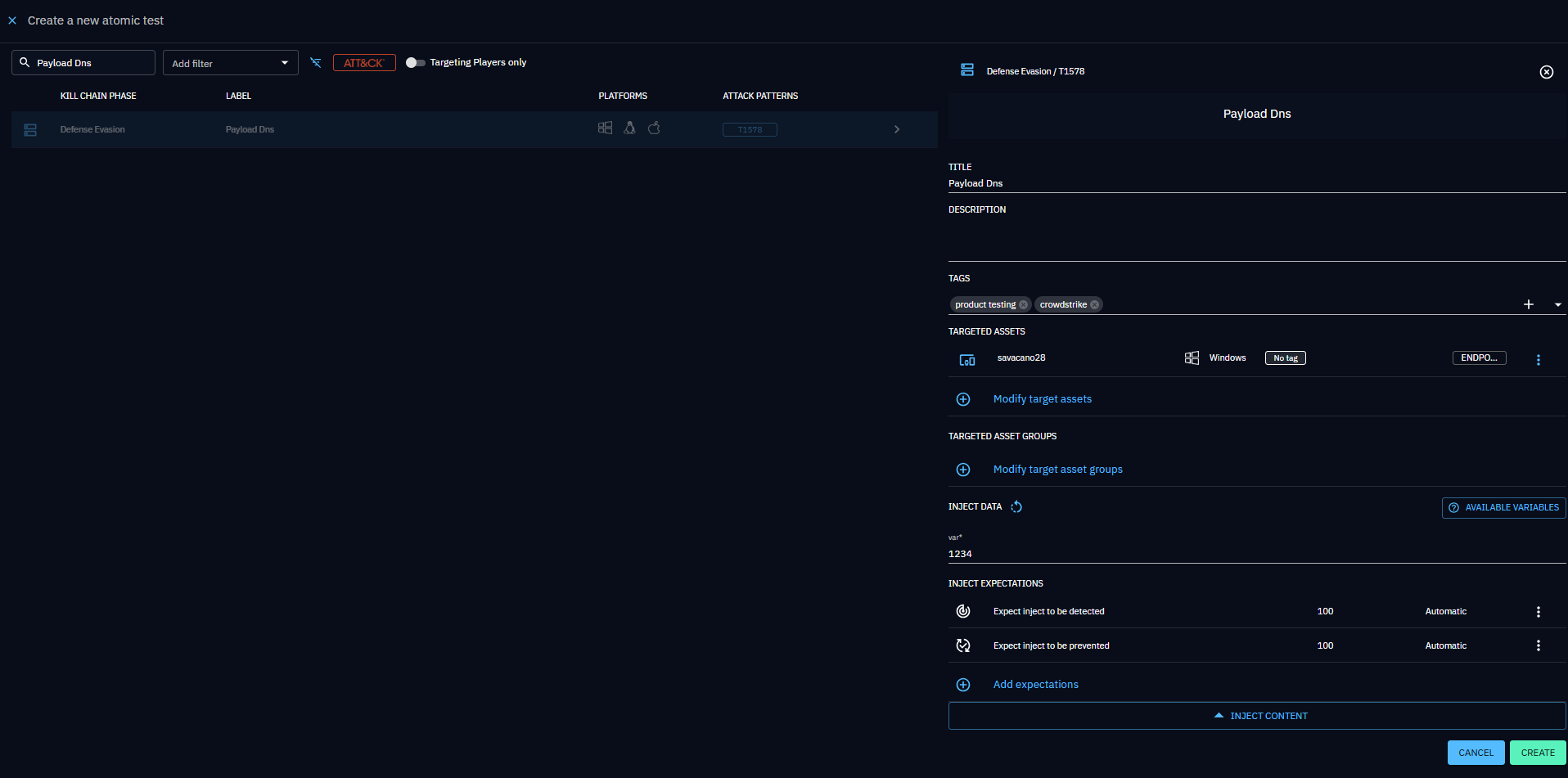
After creation, a new inject type will automatically appear in the inject types list if the implant you're using supports it (the OpenAEV Implant does).
Import / Export Payloads
Overview
OpenAEV supports importing and exporting payloads using the JSON:API specification. This enables seamless sharing of payloads across instances or within the community.
Use Cases
- Share complex payloads with teammates or the community.
- Use payloads across dev, test, and production environments.